
We use cookies on our site to track certain metrics. Read our privacy policy here to see how we keep your personal data confidential and secure.

[["Online Shopping","https:\/\/uae.sharafdg.com"],["Pre-Order iPhone Duo in UAE: Foldable Design, Features & Price","https:\/\/uae.sharafdg.com\/apple-iphone-duo\/"]]

Pre-order begins 16 October, 2026 at 4:00 PM.

00 days
:
00 hours
:
00 minutes
:
00 seconds
Pre-order is now open.

Register your interest.

Be among the first to receive details about the new iPhone and our Guaranteed Buy Back Plan.

Complete the form below to register.

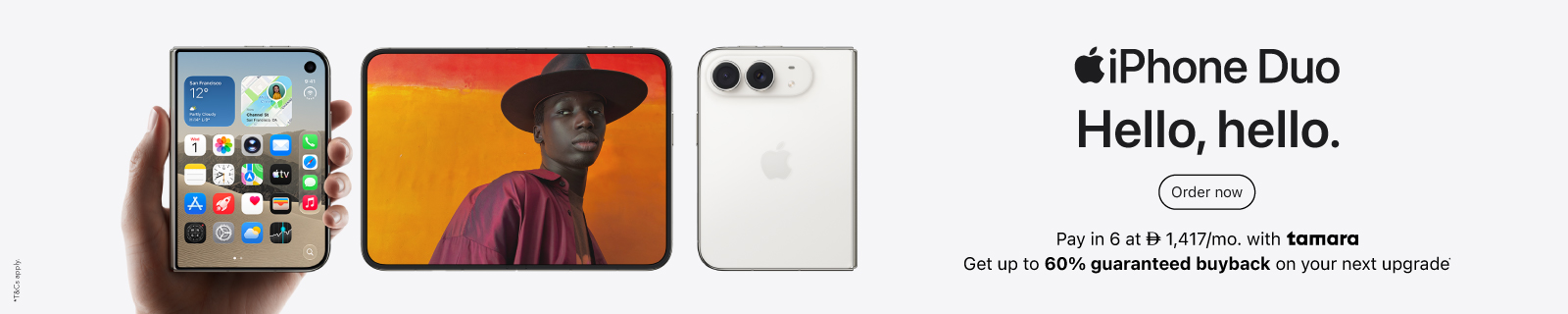
iPhone Duo UAE: Foldable Design, Camera Features and Everyday Possibilities

Unfold a larger space to read, work and watch, then close it when you want a smaller screen. iPhone Duo brings a folding design to the iPhone range, with new ways to position the phone and involve the people in your photographs.

This Sharaf DG guide explains the specifications, the ideas behind the features and the choices that matter in everyday use. Practical examples are editorial suggestions, not hands-on review results.

What makes iPhone Duo different?

Duo introduces Split View for side-by-side apps, seated viewing and StandBy without charging. Smart Take, Duo Preview and Kid Cue add new approaches to group photography.

More than a bigger version of your current phone

Think of three separate benefits: space to see more, a way to position the screen without holding it, and a display that your photo subjects can see. Those benefits solve different problems. Reading a document is about space; following a workout is about positioning; arranging a group photo is about communication.

The useful question is how often you would use each. A larger screen becomes valuable when it reduces a repeated difficulty, such as switching between a reference and your notes. A folding design also changes the shape you carry, so consider the closed phone as carefully as the open screen.

Size, build and specifications

DetailiPhone Duo
Open, width x height x depth164.6 x 117.8 x 5.2mm
Closed, width x height x depth84.1 x 117.8 x 11.3mm
Weight254g
ProcessorA20 Pro; 6-core CPU; 7-core GPU; Dual 16-core Neural Engine
SoftwareiOS 27
AuthenticationSide-button Touch ID
Connectivity5G, Wi-Fi 7, Bluetooth 6

Why the closed measurements matter

The 5.2mm figure describes the open device. It is not the thickness of the phone in your pocket. Check the closed width against the way you hold your current phone, particularly if you type one-handed or reach across the screen with your thumb.

For context, iPhone 18 Pro Max measures 78mm wide and weighs 249g. Duo's closed body is therefore 6.1mm wider and 5g heavier, calculated from Apple's figures.

That is a useful distinction: a shorter closed phone is not automatically a narrower or lighter one. Grip, pocket depth and the weight of a chosen case all contribute to everyday comfort.

Understanding the two displays

On smaller screens, scroll across to see the full table.

ScreenDiagonalResolutionDensity
Inner OLED7.6 inches1878 x 2670430ppi
Outer OLED5.4 inches1398 x 2034460ppi

Both offer adaptive refresh up to 120Hz and outdoor peak brightness up to 3,000 nits. Rounded corners reduce the actual viewable area.

Screen diagonal is not screen area

A diagonal measures the distance between opposite corners. It does not tell you how wide the screen is or how much of a document fits. Two screens with different proportions can have similar diagonals and noticeably different layouts.

For reading, consider the width of a line and the size of the text. For video, consider the shape of the film: a wider recording can still have empty space above or below it. A larger display does not guarantee that every video fills every pixel without cropping.

What nano-texture and refresh rate do

Apple describes the inner screen's nano-texture as reducing glare. This concerns reflections; it does not increase the resolution of a photograph or sharpen a low-quality video.

Refresh rate describes how often a display can update. Video frame rate describes how many frames the recording contains. They are different measurements: playing a 30fps clip on a 120Hz display does not create the missing motion detail of a recording captured at 120fps.

Multitasking and ways to position the phone

Research on one side, your decisions on the other

A useful Split View task is planning a holiday with a reference beside a working list. For example, review attraction details in one supported app and note opening times or transport questions in another. The benefit is less back-and-forth while gathering information.

Another example is studying: keep the material you are reading next to your own explanation. Write a short summary in your own words rather than repeatedly switching screens to remember a passage. App support and layout determine what is possible in a particular workflow.

Use a stable position for viewing and calls

On smaller screens, scroll across to see the full table.

SituationA practical way to approach itWhat to check
Following a cooking lessonPosition the screen before starting and keep controls within reachA dry surface away from heat and splashes
Joining a video meetingSet the camera near eye level and check the previewFraming, lighting and microphone distance
Following an exercise routinePlace the phone where the demonstration remains visibleStability and room to move safely
Reading at a deskAdjust text size before choosing the viewing distanceGlare and comfortable posture

These are suggested routines rather than claims that every app offers the same controls in every position. A stable phone also does not replace a moving camera operator: check that your subject remains inside the frame.

Cameras: understand the hardware before the zoom number

Apple lists 48MP Main and Ultra Wide rear cameras, a 12MP outer Center Stage camera and an inner under-display camera. The zoom options include 0.5x, 1x and 2x optical-quality framing.

Which view should you start with?

On smaller screens, scroll across to see the full table.

Your photographStarting pointWhy it may help
A person or everyday sceneMain cameraEstablish the composition before changing framing
A room or broad landscapeUltra WideInclude more surroundings when you cannot step farther back
A tighter portrait or detail2x optionReduce how much background enters the composition

Camera position matters as much as zoom. Moving closer changes perspective; changing framing from the same position does not produce the same spatial relationship. For people, check faces near the edges when fitting a large group into a wide view.

Is 2x optical-quality zoom a separate telephoto lens?

No. The published system has two rear cameras. The 2x option uses the Main camera's high-resolution sensor rather than adding a third telephoto lens. Do not confuse a range measured from 0.5x to 2x with a dedicated 4x camera.

If distant subjects are a priority, assess the framing you need at a real event or location. A picture of someone across a dinner table and a performer across an auditorium are very different demands.

Smart Take, Duo Preview and Kid Cue explained

Smart Take captures when the group is ready. Duo Preview lets subjects see the shot on the outer screen. Kid Cue shows animations intended to attract children's attention.

Smart Take: joining your own group photograph

The practical problem is getting out from behind the camera without rushing into position. Prepare the composition first: leave space for yourself, keep faces visible and avoid a bright window directly behind the group. Review the photograph before everyone disperses.

Automatic capture cannot ensure that every person likes their expression. Treat it as help with timing, while retaining the habit of checking the result.

Duo Preview: let your subject help with composition

When the person in front of the camera can see the frame, you can spend less time describing small adjustments. For a portrait, ask them to check posture and the space around their head. For a product demonstration, check whether their hands obscure the item.

A preview is useful feedback, but it does not solve difficult lighting. Look for distracting reflections and bright background objects before recording.

Kid Cue: attention rather than a guaranteed expression

An attention cue may help a child look towards the camera. It does not guarantee a smile, stillness or a sharp image. Choose a comfortable moment, work quickly and avoid treating the feature as a reason to prolong a session when the child is tired.

Video modes and front-camera differences

Recording optionPublished limit
Main camera Dolby Vision4K at up to 120fps
Cinematic mode4K Dolby Vision at up to 60fps
Outer front-camera Dolby Vision4K at up to 60fps
Inner camera1080p at up to 60fps

What does 120fps let you do?

If an editor plays 120 captured frames at 30 frames per second, one second of recording becomes four seconds of playback. That is quarter-speed motion, calculated from the frame rates. It is useful when the movement itself is the subject, such as a dance step or a splash.

Normal-speed footage does not need slow motion simply because the option exists. Higher recording settings also need a deliberate storage and editing plan. Capture a short sample, inspect it and choose settings around the finished video.

Cinematic effects are different from physical aperture

An edited depth effect changes the appearance of focus in the image. A physical aperture controls the opening through which light enters the camera. The two should not be described as interchangeable hardware features.

For a talking-head clip, concentrate first on clear sound, steady framing and separation between the speaker and the background. An effect is an additional creative choice, not a substitute for those basics.

Use the right front camera for your output

The inner and outer cameras have different published recording limits. Choose around the final use: a call, a casual message or a clip you intend to edit and share. Do not assume that a larger preview screen means a higher-resolution recording.

Performance, cooling and everyday expectations

Apple describes vapor-chamber cooling and reports up to 20% faster CPU performance than A19 Pro. That is a manufacturer comparison, not an independent result for every app.

What does sustained performance mean?

A short task and a long workload place different demands on a phone. Opening a document may finish quickly; a long game or repeated processing keeps the system working. Cooling is relevant to how the device manages that continuing workload.

A processor percentage does not predict how much faster a website loads on your connection. Network speed, the app, the file and the task can each be limiting factors. Assess performance against the work you actually do rather than expecting one percentage to apply everywhere.

AI features and language support

Check the particular AI feature and supported language before building it into a daily workflow. Reading or typing Arabic is a different capability from an AI tool understanding Arabic instructions. For work documents, also review your organisation's rules before providing confidential material to any connected service.

Battery ratings, charging and USB-C

On smaller screens, scroll across to see the full table.

Video playback ratingOuter screenInner screen
Apple's published maximum44 hours31 hours

Do the two ratings add together?

No. These describe alternative test conditions. Adding them would imply sequential battery capacity that the figures do not establish. They also do not predict a day divided between navigation, messaging, calls and gaming.

The sensible interpretation is that the selected display matters to the published test. Your own result depends on your mix of activities and conditions. Compare like-for-like measurements rather than treating video playback as normal working time.

Understand the charging requirement

Apple specifies up to 50% in around 20 minutes using a 60W-capable or higher adapter and USB-C cable. MagSafe and Qi2 support up to 25W.

An adapter's maximum wattage is not proof that the phone draws that power continuously. Charging also does not follow a simple linear rule: a half-charge figure should not be doubled to promise a full-charge time.

A standards-compliant USB-C adapter may still be useful even when it does not meet the advertised fast-charge condition. Apple explains that USB-C equipment can support charging, data and accessories, with capabilities depending on the cable and connected device.

A charging cable is not automatically a fast data cable

Duo lists USB 3 up to 10Gb/s and DisplayPort.

To use a faster connection, the cable and receiving device must support it too. The shape of the plug alone does not establish its speed or video capability. Before buying equipment for transferring footage, check the complete route from phone to cable to drive or computer.

Why charging sometimes pauses near 80%

Optimized Battery Charging can delay charging beyond 80% when the phone expects a long connection to power. Its purpose is to reduce time spent fully charged. Check the charging notification and settings before treating a pause as a fault.

iPhone Duo and earlier Pro models: what changes?

On smaller screens, scroll across to see the full table.

DetailiPhone 16 ProiPhone 18 ProiPhone Duo
Screen formatFixed, 6.3 inchesFixed, 6.3 inchesFolding inner screen plus outer screen
ChipA18 ProA20 ProA20 Pro
Rear camera layoutMain, Ultra Wide, TelephotoMain, Ultra Wide, TelephotoMain and Ultra Wide
Main apertureFixedVariableFixed
AuthenticationFace IDFace IDTouch ID

Moving from a Pro phone is a change in priorities

An upgrade can add a new way to work while changing a familiar camera arrangement. Someone who constantly switches between references and notes may value the folding layout. Someone who frequently photographs distant subjects should pay particular attention to the camera differences.

USB-C and a high-refresh display are already present on iPhone 16 Pro. They should not be presented as entirely new benefits for an owner of that model.

Explore our iPhone 18 Pro guide alongside Duo if you are deciding between a folding workspace and the Pro camera system. Choose the change that improves a repeated task, not simply the model with the newest shape.

Storage and planning your Apple setup

Duo is listed in Night Sky and Star White, with 256GB, 512GB, 1TB and 2TB configurations.

Estimate storage from what you keep

Your routineWhat deserves room in your estimate
Streaming and everyday appsApp growth, downloads and system space
Travel with offline entertainmentFilms, music, maps and photographs taken during the trip
Frequent recordingOriginals, edits and exported copies
A large local archiveFiles you intentionally retain between transfers

Before choosing, review your current usage rather than assigning a fixed number of photographs to each capacity. File sizes vary with format, settings and content. A creator may need less space than expected with a disciplined transfer routine, while someone keeping years of downloads may need more.

With iCloud Photos optimisation, smaller versions can remain on the device while originals are stored in iCloud. Cloud capacity and phone capacity are separate; cloud storage does not increase the physical storage inside the phone.

Apple Pencil: understand the timing and the model

Apple says USB-C Apple Pencil support is coming later in 2026. Treat this as an announced future capability, not a feature already available.

The USB-C Pencil differs from Pencil Pro: Apple's comparison lists tilt sensitivity but not pressure sensitivity or wireless pairing and charging. Do not assume that all Pencil features carry across to Duo.

Once support is available, check the specific app and software requirements for your intended task, such as annotation. Handwritten notes, a quick sketch and pressure-sensitive illustration are different needs.

AirPods for a listening and recording routine

Explore AirPods 5 for listening and calls. Apple lists noise cancellation, Transparency and camera remote control, and recommends current software for full functionality.

A practical setup could involve positioning the phone for a lesson while keeping audio close to you. Check microphone selection before recording an important clip; hearing sound through earphones does not by itself tell you which microphone an app is using.

Apple Watch for activity alongside your phone

Explore Apple Watch Series 12 and Apple Watch Ultra 4 around the activities you actually track. Review the exact pairing requirements before selecting a watch for Duo.

For regular walking or training, think about the information you want during the activity and what you want to review afterwards. Fit, controls and comfortable wear matter alongside a feature list. You do not need to replace every accessory at the same time.

UAE setup and frequently asked questions

Can I use my physical SIM or keep two numbers?

Duo uses eSIM rather than a physical SIM. Apple describes using two numbers, with activation dependent on a supporting provider and plan.

Arrange the transfer before relying on the new phone for calls or verification messages. Keep access to your existing service until the new connection is working.

Does it have Face ID?

The listed biometric method is Touch ID in the side button. Consider the button position when checking your grip and selecting a case; access to it is part of everyday use.

Is the screen guaranteed to have no visible crease?

Apple describes construction intended to minimise the crease. That is not a guarantee of invisibility under every light or viewing angle. If this matters to you, inspect the display under the conditions in which you expect to use it.

What comes in the box?

Apple lists the phone and a 1m USB-C charging cable. Plan the adapter separately and check what you already own before buying another.

Can I treat the folding phone as a laptop replacement?

Evaluate one task at a time. Reading and marking a document is different from running desktop software, connecting specialist equipment or managing a large spreadsheet. Make a list of your essential apps and file types, then confirm the exact mobile workflow.

Is water resistance the same as waterproofing?

Apple lists IP68, tested to 6 metres for up to 30 minutes. This is a laboratory rating, not an invitation to use the phone for underwater photography.

Apple explains that water resistance can decline with wear and advises against swimming, pressurised water and charging a wet iPhone. Drying and care instructions matter after accidental exposure.

Can I carry it without a case or add any screen protector?

Choose protection specifically intended for the model and follow the manufacturer's fitting and care guidance. A folding display, hinge and side controls create different fit requirements from a conventional phone. Do not assume that a protector or case for another iPhone is suitable.

Will every app work the same way on both screens?

Do not assume identical layouts. Assess the particular app, its version and the task you want to perform. A useful check is whether the controls, text size and document layout remain comfortable when you change how you use the phone.

Does a faster chip make every connection faster?

No. The processor cannot remove limits imposed by your internet connection, a remote service or an accessory. For a slow transfer or download, check where the delay occurs before treating it as a phone-performance issue.

Back to top
Added to cart
Cart Total D

People Also Bought